Teacher Module Errors: Managing Credentials in UDISE Plus
Hey friend! If you’re handling the teacher data in the UDISE Plus Teacher Module, you’ve probably bumped into credential‑problems — login issues, forgotten passwords, wrong usernames, etc. These may seem small, but they can mess up your whole workflow. Let’s walk through what goes wrong, why it matters, and how to fix it — plain and simple.

What we mean by “credential errors”
When we say credential errors in UDISE Plus’ Teacher Module, we mean things like:
Why getting credentials right matters
If you can’t log in, you can’t update teacher info (joining, transfer, left status) which means your school’s data will show incomplete.
The system uses your login to certify that you, the authorised person, have made the updates. Without access, you might miss deadlines or data may be rejected.
Wrong login also leads to data security risks. If someone else uses credentials improperly, your school’s teacher data may be compromised.
Finally: when everything is smooth, you’ve got one less worry. You can focus on the teacher‑data itself, not battling tech.
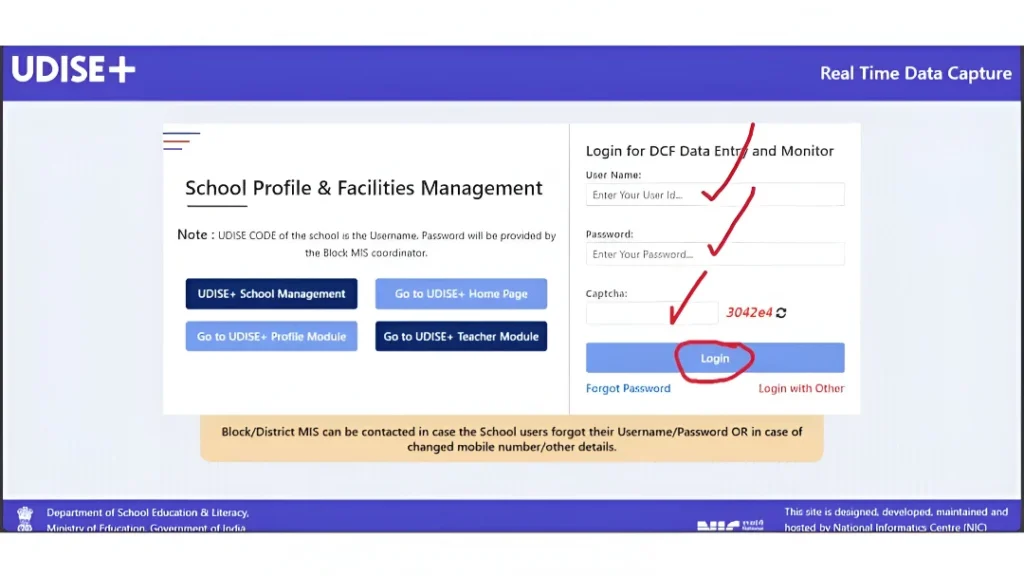
Step‑by‑Step: Fixing credential issues
Here’s what to do if you’re stuck:
- Typically it is the school’s 11‑digit UDISE code (check your state’s variant). UDISE+2UDISE+2
- If your school used a 10‑digit code previously, see if the new system expects an 11‑digit code (add a leading 0). UDISE+1
Ensure you entered it exactly (capital letters matter).
If it’s your first login, most states ask you to change it immediately. UDISE+1
- Make sure to refresh the captcha. Some fail because of auto‑fill or browser extensions. UDISE+1
- Try another browser or clear cache if things don’t work.
If your registered mobile number changed, you may not get OTP for password reset. Contact your Block/District MIS coordinator. Education for All in India+1
You log in fine but don’t see Teacher Module — it could be your role hasn’t been linked or the wrong module is selected. Check with MIS. UDISE
Use the “Forgot Password” link if available.
If that fails, send a request to the MIS desk (Block/District) with your UDISE code, mobile number, error screenshot.
Keep a backup of your login credentials (securely) so you can refer if there’s a glitch.
Tips to avoid credential‑problems next year
Common mistakes & how to fix them
| Mistake | Why it happens | Quick fix |
|---|---|---|
| Username “not found” | Wrong UDISE code (10 vs 11 digits) or module mismatch | Add leading 0 if needed, ensure you’re in Teacher Module |
| Password “invalid” | Caps lock, outdated password, first‑time change not done | Re‑enter carefully, use Forgot Password, change as required |
| Captcha keeps failing | Browser auto‑fill, cache issues, unusual characters | Refresh captcha, clear cache, try alternative browser |
| OTP not received | Mobile changed, network issue | Update mobile via MIS, check signal/permissions |
| Role missing Seller can’t access Teacher Module | Module permissions not assigned | Contact MIS to assign correct role |
Frequently Asked Questions (FAQs)
Final Words
Credentials might seem like a small bother, but they’re the key to getting into the Teacher Module and doing your job without hiccups. A few minutes now to check your login access, confirm your details, update mobile info — can save you hours of frustration later. Stay ahead of it, and you’ll have smooth sailing when it’s time to update teacher records.


